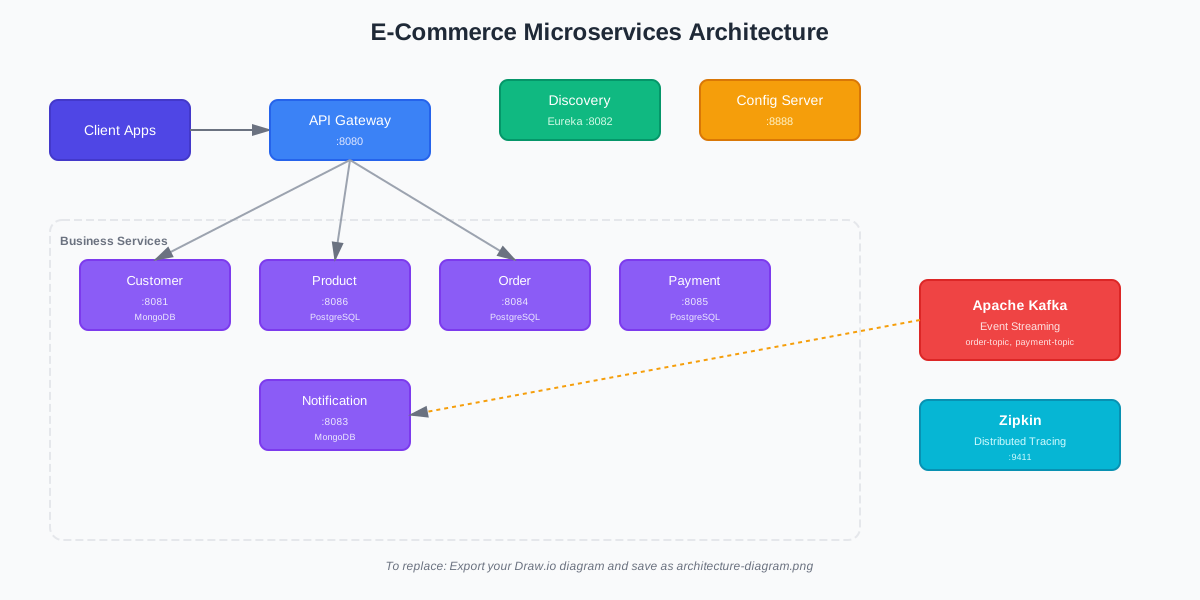
Production-ready e-commerce platform with 8 microservices using Spring Boot, Kafka, and Docker
Microservices
Databases
Design Patterns
Containerized
The key patterns and technologies used
Eureka handles service registration and discovery automatically
Single entry point that routes requests to the right service
All service configurations managed in one place
Kafka handles async messaging between services
PostgreSQL and MongoDB - each service owns its data
Track requests across all services with Zipkin
Handles distributed transactions across multiple services
Everything runs in containers with docker-compose
Automatic HTML emails for orders and payments
Modern microservices architecture with cloud-native patterns
Demo: Complete walkthrough of the microservices platform
8 independent services working together seamlessly
Centralized configuration management using Spring Cloud Config
Service registry for dynamic service discovery
Single entry point for all client requests
Customer profile and address management
Product catalog and inventory management
Order orchestration and workflow management
Payment processing and transaction management
Event-driven email notification system
See the platform in action
Service Registry Dashboard
http://localhost:8082
Distributed Tracing UI
http://localhost:9411
PostgreSQL Management
http://localhost:5050
MongoDB Management
http://localhost:8081
Example API calls you can test once the platform is running:
curl -X POST http://localhost:8080/api/v1/customers \
-H "Content-Type: application/json" \
-d '{
"firstname": "John",
"lastname": "Doe",
"email": "john.doe@example.com",
"address": {
"street": "Main Street",
"houseNumber": "123",
"zipCode": "12345"
}
}'
curl http://localhost:8080/api/v1/products
curl -X POST http://localhost:8080/api/v1/orders \
-H "Content-Type: application/json" \
-d '{
"customerId": "customer-id-here",
"paymentMethod": "CREDIT_CARD",
"products": [
{
"productId": 1,
"quantity": 2
}
]
}'
Get up and running in minutes
Ensure you have the following installed:
# Verify installations
java -version
docker --version
docker-compose --version
git clone https://github.com/RakeshSingh38/ekart-microservices.git
cd microservices-java
Launch all services with Docker Compose:
# Start all services
docker-compose up -d
# Check service status
docker-compose ps
# View logs
docker-compose logs -f
Services will start in the correct order. Config Server starts first, followed by Discovery, then Gateway, and finally business services.
Access the following dashboards to verify all services are running:
Test the complete order flow:
# Run automated E2E test
./scripts/test-e2e.sh
# Or manually test APIs
curl http://localhost:8080/api/v1/products
curl http://localhost:8080/api/v1/customers
If successful, you'll see order confirmation and payment confirmation emails in MailDev!